
Services

Odoo inventory software shows you the real stock of every warehouse in real time. If answering "How much of this item do I have right now, and in which warehouse?" takes two phone calls and an Excel file, you need inventory management software that answers it at a glance. Odoo does exactly that: every receipt, transfer and delivery is recorded by scanning a barcode the moment it happens, so the stock in every warehouse updates instantly. Here we explain how Odoo inventory and warehouse management works in Saudi Arabia in versions 18 and 19, from barcodes, lots and expiry dates to inter-warehouse transfers, automatic reordering, cycle counts and valuation methods. We apply it all to the scenario of a distribution company with three warehouses in Riyadh, Jeddah and Dammam, explain how inventory connects to e-invoicing, then present the approximate cost in SAR and a checklist to help you decide before signing with any provider.

The problem is not Excel itself. The problem is that the stock recorded in it lags behind reality. The warehouse receives goods in the morning, sales sells at noon, and the accountant updates the file at the end of the day or the week. In that gap, what every operations manager knows happens:
Simple accounting software solves part of this, but it struggles with multiple warehouses and lots. We explained this turning point in detail in our comparison Odoo vs Qoyod vs Daftra: when multiple stock locations and branches become a daily part of your business, you need inventory management software built around inventory itself, not an accounting system with inventory added later.
The core idea behind any modern inventory management software, Odoo included, is that stock is never entered manually. Stock is the result of movements. Every item that comes in, goes out or moves has a documented "stock move": from which location, to which location, in what quantity, who performed it and when. So the same item never has two different balances in two places in the system. Configuring these locations and routes to match your actual warehouses is the core of our Odoo ERP development and implementation service.
In the Odoo Inventory app, you define each warehouse (Riyadh, Jeddah, Dammam), then divide it into internal locations as needed: the receiving area, aisles, shelves, the cold room and the shipping area. You then set Putaway Rules, so the system suggests where the employee should place each item on receipt, such as putting chilled items directly into the cold room, or placing a specific item on its dedicated shelf.
The most important thing the system gives a sales manager is that it distinguishes between three numbers:
When sales reps see the forecasted quantity, not just the on-hand quantity, double-selling the same carton stops. That alone solves a large share of customer complaints in distribution companies.
Odoo inventory software lets you design the receiving route according to the size of your warehouse. A small warehouse receives in one step: goods go straight to the shelf. A larger warehouse receives in two steps (receive, then store) or three (receive, then quality check, then store). The same applies to shipping: one step, pack then ship, or pick then pack then ship. The extra steps are not bureaucracy; they are checkpoints that stop the wrong item from going out or damaged goods from reaching the shelf.
This is where Odoo Inventory moves from a "record" to an "operating tool", and where the difference between real inventory management software and a spreadsheet shows. Real-time stock is only accurate if each movement is recorded the moment it happens, and that does not happen by typing. It happens by scanning barcodes.
Odoo's Barcode app (part of the Enterprise edition) runs on Android handheld scanners, on a regular smartphone using its camera, or with a barcode reader connected to a computer. The employee opens the receipt, scans the item, scans the location, and the stock updates instantly. If they scan an item that is not on the purchase order, or a larger quantity than ordered, the system alerts them on the spot before the error becomes a stock count discrepancy. Versions 18 and 19 improved the app's speed on handheld devices and made receiving, picking and internal transfers easier.
Odoo also supports GS1 barcodes, which carry the product number, lot number and expiry date in a single code, so all of them are read in one scan instead of entering each piece of information manually (see Odoo's official documentation on GS1 nomenclature). This point is especially important for food and pharmaceutical distributors.
For each item, you choose the tracking method: no tracking, by lot, or by serial number. Food and consumer items are usually tracked by lot. When expiry dates are enabled, Odoo calculates for each lot an expiration date, a "best before" date, a removal date and an alert date, and sends an alert before the lot reaches its date, as explained in Odoo's documentation on expiration dates.
Most importantly, choose the FEFO removal strategy (first expired, first out). The system then automatically suggests the lot closest to expiry to the picker, so nothing depends on the storekeeper's memory. Odoo also offers other strategies such as FIFO, LIFO and closest location, detailed in its documentation on removal strategies, so you can choose what suits each product category.
Electrical appliances, spare parts and equipment are tracked with a unique serial number for each unit. You know which supplier it came from, when it arrived, which customer it was sold to and on which invoice. When a customer comes back with a warranty claim, the customer service agent finds the unit's full history in seconds.
If your company distributes human medicines, you are subject to the drug track-and-trace system RSD launched by the Saudi Food and Drug Authority. The system relies on GS1 standards: a GTIN for the product, a unique serial number for each pack, and the lot number and expiry date in a two-dimensional DataMatrix code, with each warehouse identified by a GLN global location number. Odoo stores the lot, serial number and expiry date for each pack, but electronic reporting to the RSD platform itself usually requires a custom integration or an approved intermediary. Ask your provider about this point specifically before signing.
For food distributors, tracking by lot and expiry date is not a luxury. In any product recall, you need to know within minutes which customers received the affected lot. In Odoo, the Traceability report gives you that list directly from the lot number.
To make this concrete, take a hypothetical but realistic example: a distributor of food and personal care products, with its main warehouse in Riyadh and two branch warehouses in Jeddah and Dammam. It handles about 2,000 items, half of which have an expiry date, and sells to supermarkets and retail shops through sales reps in all three cities.
When the Jeddah warehouse needs stock, Odoo inventory software creates two linked movements: a delivery order from Riyadh and a receipt in Jeddah. Between the two steps, the goods sit in a Transit location that is visible in reports. In other words, a shipment on the highway does not vanish from the system; it shows as quantity in transit until a Jeddah employee scans it on arrival. If it arrives short, the discrepancy appears immediately, along with the stage where it happened.
You set a minimum and a maximum for each item in each warehouse (Reordering Rules). When an item's stock in Dammam drops below the minimum, the system suggests a transfer from Riyadh. When Riyadh's stock drops, it suggests a purchase order from the usual supplier for the quantity that brings the stock back to the maximum. From the Replenishment screen, the purchasing officer reviews all suggestions in one place and approves them with a click. Newer versions try to improve these suggestions based on sales history and each supplier's lead time.
A tip from the field: do not set the same limits in all three cities. Jeddah's consumption usually rises during Umrah seasons, and demand for some items differs between regions. Review the limits every quarter based on actual sales in each warehouse.
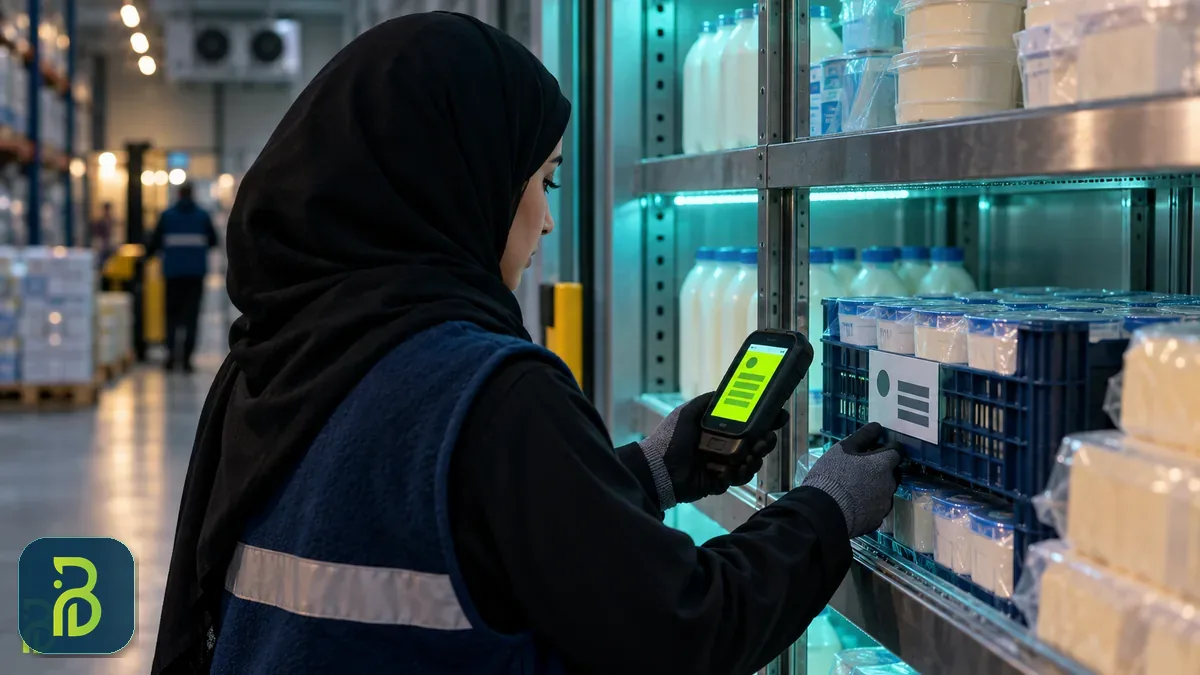
Do you know the stock of every warehouse right now without a single phone call?
Book a hands-on demo with the Bateel team of managing your warehouses with barcodes, lots and expiry dates, using data similar to your company's.
Any inventory counting software worth using must answer two questions: Does the quantity in the system match the shelf? And what is this inventory worth in my books?
Instead of a single annual count that halts work for days, Odoo inventory software supports Cycle Counts: you set for each location how many days pass between counts. A fast-moving aisle might be counted every two weeks, for example, and slow-moving shelves every three months. The system creates count tasks automatically when they are due, the employee scans the shelf with a barcode device, and discrepancies appear instantly and are approved after a supervisor's review. You can still set a date for the full annual count for the financial year-end close. The result: a discrepancy is caught days after it happens, not a year later, which makes its cause much easier to find.
Counting keeps quantities accurate, while KPIs tell you whether the inventory itself is healthy. Four KPIs are enough for a short weekly meeting:
ABC classification helps direct cycle counts: the few items that make up most of the inventory value are counted more often than others. Odoo's stock reports, moves analysis and valuation give you the raw figures for these KPIs, and ready-made views and dashboards for them can be configured during implementation. The same routes also cover other cases you may need, such as shipping directly from the supplier to the customer (Dropship), moving straight from receiving to shipping (Cross-dock), and recording damaged goods (Scrap) with an accounting entry instead of writing them off manually.
Odoo supports three methods for calculating inventory cost, and you choose one for each product category:
| Method | How it works | When it suits a Saudi company |
|---|---|---|
| Standard cost | A fixed cost that you set and adjust periodically | Factories and items with stable costs |
| Weighted average cost (AVCO) | The average cost is recalculated with every new receipt | Most distribution and retail companies, because it absorbs fluctuations in supplier prices |
| First in, first out (FIFO) | The cost of the oldest lot is used first | Imported items with highly variable costs, and items with a shelf life |
With automated (Perpetual) valuation, every stock move becomes an accounting entry, so the finance manager sees cost of goods sold and inventory value daily without waiting for month-end. Version 19 reorganized valuation to make the Periodic option easier for those who prefer it, with closing entries suggested automatically. An important warning: change the costing method before transactions start, not after, because changing it on an item with previous movements is not simple. Decide it during the analysis phase with your accountant.
If you import through Jeddah Islamic Port or King Abdulaziz Port in Dammam, the cost of an item is not just the supplier's price. There is freight, customs clearance, customs duties and inland transport. In Odoo, these costs are allocated across the shipment's items (by value, weight, volume or quantity), so they become part of the item's true cost. Your selling prices are then built on a correct profit margin, not on the supplier's price alone.
A question we often hear from operations managers: "Does every stock movement need an e-invoice?" The answer is no. The e-invoice mandated by the Zakat, Tax and Customs Authority (ZATCA) is tied to sales and supplies to customers, not to the movement of goods within your business. A transfer from the Riyadh warehouse to the Jeddah warehouse within the same company is an internal stock movement, not a sale, so it usually does not require a tax invoice. That said, review special cases (such as transfers between two companies in the same group with different commercial registrations) with your tax advisor.
So where does the link come in? In Odoo, the whole cycle is connected:
The real benefit here is that the invoice and the inventory never disagree: there is no invoice for a quantity that never left the warehouse, and no shipment that left without an invoice. That is what protects you in any tax audit. You will find the details of the integration requirements and both phases in our guide to e-invoicing in Saudi Arabia.
And if you also sell through an online store or point-of-sale terminals in branches, the same stock feeds every channel. We explained linking inventory to point of sale in our article Odoo for restaurants and point of sale, and the same logic applies to retail shops. If your online store is still being built, the team behind Bateel's e-commerce store design service designs the store from the start so that it reads stock from the real inventory, not from a manually entered number.
The cost of inventory management software in Odoo consists of four items: Odoo licenses, implementation and configuration, hardware, and annual support. The following figures are approximate as of 2026, vary with the number of warehouses and items, the quality of your current data and the amount of customization, and are exclusive of 15% VAT:
| Item | One warehouse and simple items | 2–3 warehouses with barcodes, lots and expiry | Multiple warehouses with integrations and customization |
|---|---|---|---|
| Implementation, configuration, data migration and training | SAR 20,000–45,000 | SAR 60,000–150,000 | SAR 150,000 and up |
| Handheld barcode scanners (per device) | SAR 1,000–5,000 | SAR 1,000–5,000 | Industrial devices with higher durability and price |
| Barcode label printer (per printer) | SAR 800–3,000 | SAR 1,500–4,000 | Depends on the number of print stations |
| Approximate implementation time | 4–8 weeks | 10–16 weeks | 4–8 months in phases |
Odoo Enterprise licenses are added as a subscription per internal user. Based on the currently published prices, they come to roughly SAR 51–63 per user per month on the Standard plan and SAR 96–120 on the Custom plan, depending on annual or monthly billing, before 15% VAT, and they change periodically. The Custom plan is required if you need multiple companies or code customizations on Odoo.sh. A practical warning: the Barcode app and the Saudi e-invoicing package are Enterprise features, so watch out if you are offered the Community edition at a lower price. To understand all project cost items and how to spread your budget across phases, read our guide to Odoo implementation cost in Saudi Arabia.
Do not forget an item many overlook: Wi-Fi coverage inside the warehouse. Scanners need a stable connection in every aisle, and warehouses with tall metal racking have many "dead zones". Test the coverage before buying the devices, not after.
Before requesting quotes, answer these questions within your company. Every "no" here means extra project work that must be factored into the timeline and budget.
At Bateel, we ask ourselves these questions during the analysis phase with every client, and experience has taught us that clear answers before starting save weeks during implementation. If you want the broader picture of Odoo and its modules before going deeper into inventory, start with our complete guide to Odoo ERP for Saudi companies.
One more detail completes the picture: field sales reps need to see available stock on their phones before confirming an order with a customer. Odoo runs in the mobile browser, and if you need a branded app for your sales reps or wholesale customers, our mobile app development team builds it connected to the same inventory.
Choosing an inventory system for Saudi companies depends on your size. A business with one warehouse and few items can usually make do with accounting software that includes basic inventory. But multi-warehouse distribution and wholesale companies that need barcodes, lots, expiry dates, transfers between cities and e-invoicing integration are better served by an integrated ERP system such as Odoo.
Yes. The Barcode app in Odoo Enterprise runs on Android scanners and smartphones and reads GS1 barcodes that carry the lot number and expiry date. The system tracks each lot with its expiry date, alerts you before it expires, and suggests dispatching the soonest-expiring stock first through the FEFO strategy. You can also track devices with a serial number for each unit.
Single-warehouse projects start at about SAR 20,000 to 45,000 for implementation, rising to SAR 60,000–150,000 for a company with 2–3 warehouses using barcodes and lots. Licenses are added at about SAR 51–63 per user per month (Standard) or SAR 96–120 (Custom), plus scanners and label printers. All figures are approximate for 2026, vary with the number of warehouses and items, and exclude 15% VAT.
Usually not. A transfer between warehouses of the same business is an internal stock movement, not a sale, so no tax invoice is issued for it. The e-invoice is issued when selling to a customer, and Odoo issues it for the quantity actually delivered. Transfers between two different companies in the same group should be reviewed with your tax advisor.
Items and opening balances are imported from Excel or CSV files using Odoo's ready-made templates, after standardizing item codes and cleaning up duplicates. Most importantly, do a physical count right before go-live, so the new system starts with correct balances rather than the old file's errors. Ideally, go-live should happen at the start of an accounting month.
The value of Odoo inventory software does not come from its screens but from three things: every movement recorded by barcode the moment it happens; every lot and expiry date tracked from supplier to customer; and every movement turned into a correct accounting figure and invoice. A company that gets there stops selling what it does not have, reduces waste from expired products, and knows its real profit every month.
At Bateel Tech Solutions in Riyadh, we implement Odoo inventory and warehouse projects with full Saudi configuration: warehouse and route design, barcodes, lots and expiry dates, e-invoicing integration, and Arabic training for storekeepers with post-launch support. Contact us on WhatsApp or through our Contact Us Page, and get a free consultation and a clear quote for your warehouses.
